
Home Lab 2026
I thought it made sense to make my first post be an outline of my current home lab/Wireless setup. I expect this page to be updated periodically with relevant links to dedicated posts on topics mentioned here.
Despite my love for wireless technology and being the principal wireless engineer for the company I work for, I will be the first to anyone to go wired if they can. So after running cat6 to the desktops and laptop docks, I felt the limited use of wireless didn’t need anything better than the the Verizon issued router (FiOS-G1100 .11ac router). Only recently did I get around to upgrading the home infrastructure and that was because I had yet to receive any Wi-Fi 7 APs from work and I wanted to mess around with MLO. I purchased the TP Link Archer BE550 Wi-Fi 7 router on sale for under $200 and swapped out the G1100.
Below is my network topology for my home office. I have outlined each wireless Station’s generation (and reported capabilities if its modular like the client adapters but not fixed radios like laptops or mobile devices)
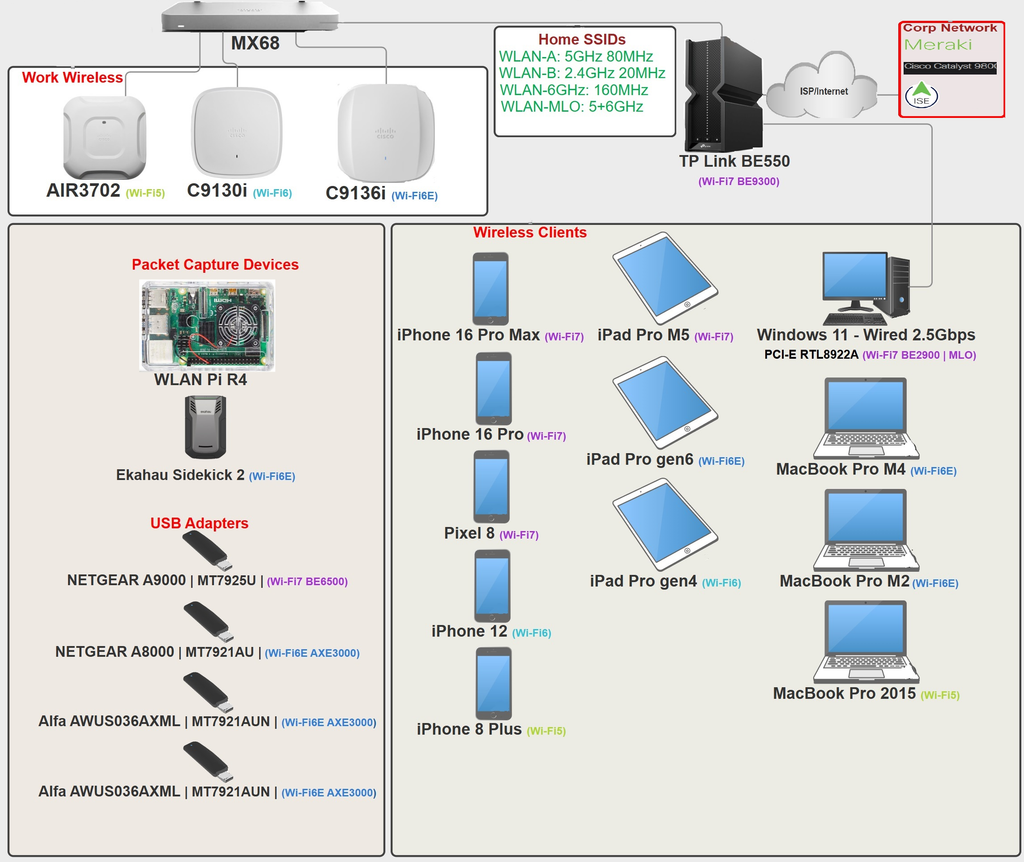
My home office is a mess of RF devices and antennas but it basically can be divided into 3 zones or groups, Home, Work, Lab/Testing.
The Home “production” network
What my personal devices use day to day for normal connectivity which I have spread across 4 SSIDs shown in the network topology.
WLAN-B: For my 2.4GHz only/IoT devices, generally low throughput and not impacted by the slower speeds (or my neighbors 40MHz wide channels…).
WLAN-A: For the more content heavy devices like smart TVs or older laptops that lack 6GHz radios.
WLAN-6GHz: The preferred band for content heavy devices but pretty much only “normal” devices come with these radios and not Smart TVs etc.
WLAN-MLO: The reason for the upgrade. All of my Wi-Fi 7 capable clients connect to this SSID as each supports MLO in some way.
The TP Link BE550’s implementation of MLO is combining the 5GHz and 6GHz bands only. It can do 320MHz wide 6GHz but none of my clients support more than 160MHz. My desktop’s built in PCI-E Realtek wireless NIC is able to connect to both bands at once but its usage of MLO is limited to transmitting on only 1 and the second link to the other band is there for instant switchover rather than combining traffic over both at once. But both the BE550 and my desktop can do 4KQAM and I have validated its achievable with my desktop showing 2882Mbps data rate on the 160MHz wide 6GHz SSID.
The Work network
Even prior to the 2020 mass work from home push that happened, I have had roughly the same setup so I could immediately assist with any wireless issues or perform wireless changes that would require a trip to the office for all of 5 minutes to verify the change was successful before heading back home again. I use a Meraki MX68 (but I also have an MX67, MX68CW, MX75, Z4C and some others for when I want to replicate a pure Meraki users setup) that will tunnel back to the home office Meraki Hub. With this set up I can have my wired clients effectively on prem but 99% of the time the only wired clients I have are the Cisco APs.
These APs form their CAPWAP tunnel through the VPN tunnel and while that does add additional latency and extra hardware between my wireless clients and the network, it provides me with an easy way to troubleshoot issues across the enterprise as I simply change which WLC my AP is connected to and match its AP group to the problem location’s APs if AireOS WLCs or tags if its the 9800 WLCs. I have about 6 different models so I can also match that to the problem area incase its a model specific issue. I’ll be adding at least 2 more models soon with our deployment of the CW9176s and CW9178s.
The Lab/Testing network
This is more like the middle section of a standard 2 circle Venn Diagram than the 3rd circle in a triple. I generally do a lot of my testing on “Work” network as its more validation and client testing than it is 802.11 feature tests, but for things like MLO where work has yet to implement the hardware for it, I use my home equipment and either spin up a new SSID so my changes don’t cause issues for other users etc.
For some of my work testing I will spin up clones of the production SSIDs and have them broadcast only on my APs for when changes cause the WLAN to bounce.
But outside of the overlapping circles of the home and work network is also the pure test environment which isn’t limited to just 802.11 but also LoRa Meshtastic, HAM radio, SDR, Satellite Weather RX HRIT/LRIT and whatever else catches my special interest.
Hardware/Software Tools
In my topology I have just included the hardware specific to my 802.11 work and have not listed any of the software applications such as WiFi Explorer Pro 3, Airtool 2, WiFi Signal for my MacBooks, WiFi Explorer Pi and Airtool Pi for my iPhones from Intuitibits, and WLAN Pros Toolbox from WLAN Professionals for all devices.
Packet Captures
I Primarily use my MBP to do my wireless packet captures since 90% of the time I only want to capture on a single channel. If I need to capture on more than 1 channel at a time, I will switch to using the Ekahau Sidekick 2 or WLAN Pi with 2 or more USB adapters depending on the need but so far I have yet to go beyond 3. I rarely will make use of sniffer mode on the APs as its less convenient to do for a simple capture at home and in the field it would take down a client serving radio. For work production captures I have found that the packet capture troubleshooting option on the 9800 WLCs to be very good and adds the benefit of having the traffic decrypted for when that is needed. I use Wireshark for all the pcap readings with mrn-cciew’s RockStarWiFi profile.
Wi-Fi and Spectrum analysis
The Ekahau Sidekick 2 is the the only dedicated piece of hardware I have for spectrum analysis. It works great and its whole feature set and software suite is what I use for my designs and surveys at work. BUT, this is an expensive piece of gear and then you need to include the software licensing subscription which makes this a tool I’ll only use when someone else is paying for it.
The WLAN Pi while not as capable as the 10x priced Sidekick 2, performs a decent job at Wi-Fi (not RF) analysis and can be set up with Grafana to do longer term monitoring for this use case. But the primary Wi-Fi analyzer I use is WiFi Explorer Pro 3 which can use either the native wireless NIC on the Mac or can use the WLAN Pi as a remote sensor.
Misc.
I also make use of some RF shielding/reflective material for my lab for various purposes. I have build a small enclosure using a plastic bin for shoes, copper tape, and Faraday fabric to be able to attenuate an APs signal to simulate a client device moving away from the AP and getting closer to another so I can trigger a roaming event to capture. I have also made some RF reflectors that while impractical for anything other than a home lab, can increase the signal of my home network to my desk by 20dB+.